
Email marketing is still one of the most reliable ways to nurture leads, close deals, and stay connected with customers. But most small and mid-sized businesses face the same challenge keeping their CRM and email marketing tools fully synchronized without spending thousands of dollars on multiple platforms.
That’s exactly why Pipedrive Email Campaigns, an add-on to Pipedrive CRM, has become so popular. It brings email creation, automation, segmentation, and performance tracking directly inside the CRM so sales and marketing teams can work together in one place.
What is Pipedrive Email Campaigns?
Pipedrive Email Campaigns is an add-on inside Pipedrive that helps businesses send newsletters, automate follow-ups, segment leads, and track campaign performance all inside the CRM.
Instead of connecting Pipedrive with third-party apps like Mailchimp or ActiveCampaign, you can manage everything from one dashboard.
Pipedrive Email Campaigns Pricing Overview (2026)
Pipedrive Campaigns isn’t included for free, it’s a paid add-on.
Here are the latest pricing details:
| Plan | Price | Best For |
| Email Marketing Add-on | $16/month per user | Sending newsletters, basic campaigns, marketing automation |
| Email Marketing Add-on + CRM Plan (Combined) | Varies ($14–$99/month) | Businesses using full CRM + email marketing |
To use Campaigns, you must already be subscribed to a Pipedrive CRM plan such as:
- Essential ($14/mo)
- Advanced ($24/mo)
- Professional ($49/mo)
- Power ($64/mo)
- Enterprise ($99/mo)
The Email Campaigns add-on is simply added on top.
Want smarter pipelines and automated follow-ups? Sign up for Pipedrive via our Axis Consulting partner link and experience a real sales upgrade
What’s Included in Pipedrive Email Campaigns?
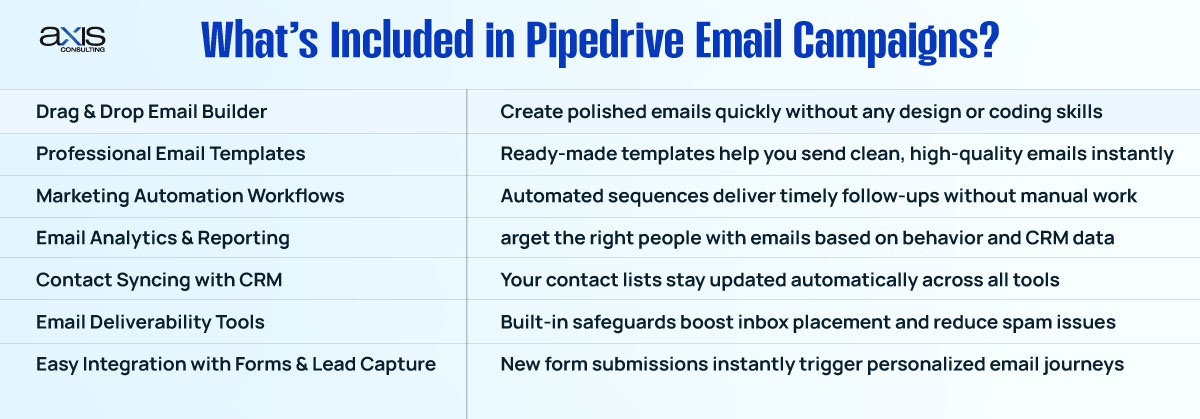
Pipedrive Email Campaigns is designed to simplify marketing for small businesses. You don’t need to juggle multiple dashboards or integrations; everything connects smoothly to your contacts, deals, and automation workflows.
Here is everything included:
1. Drag-and-Drop Email Builder
Pipedrive comes with a beginner-friendly, drag-and-drop email editor. You can quickly build:
- Newsletters
- Announcements
- Promotional emails
- Product updates
- Event invitations
- Onboarding sequences
The interface is clean and intuitive, no technical skills needed.
Why it matters
Most small businesses want fast, clean, and mobile-responsive emails. Pipedrive provides templates that look professional without needing a designer.
2. Professional Email Templates
Pipedrive includes dozens of pre-built templates optimized for:
- Welcome emails
- Lead nurturing
- Sales announcements
- Holiday campaigns
- Re-engagement
- Follow-ups
You can fully customize colors, buttons, fonts, and layouts to match your brand.
The best part?
Templates automatically adjust for mobile viewing, an essential factor for email deliverability and conversions.
3. Marketing Automation Workflows
This is where Pipedrive Campaigns become powerful. You can automate:
- Welcome sequences
- Post-form submission emails
- Abandoned lead follow-ups
- Proposal reminders
- Lead nurturing flows
- Cold-to-warm conversion sequences
Automation triggers include:
- Email opened
- Link clicked
- Tag applied
- Deal created
- Lead moved to another stage
- Contact added to a list
Why automation matters
Automation saves sales teams hours and improves lead conversion without extra manual work.
4. Smart Audience Segmentation
Pipedrive Campaigns uses CRM data to let you segment audiences by:
- Lead source
- Status
- Deal stage
- Geography
- Engagement metrics
- Custom fields
- Product interests
This makes personalized marketing much easier.
5. Email Analytics & Reporting
Every email campaign comes with detailed analytics, including:
- Opens
- Clicks
- Unsubscribes
- Bounce rate
- Time-based engagement
- Link performance
- Device data
You can also see how emails influence deals and revenue—something most standalone email tools cannot show.
Why this is important
Marketing results become clearer, helping you make better decisions about content and timing.
6. Contact Syncing with CRM
All contacts, leads, and deals inside Pipedrive are automatically synced with Campaigns.
You don’t need:
- Manual CSV uploads
- Complex integrations
- API setups
This eliminates mistakes and keeps your database clean.
7. Email Deliverability Tools
Pipedrive includes features that improve deliverability:
- Sender authentication (SPF/DKIM)
- Clean list management
- Bounce monitoring
- Spam-trigger checks
This helps your emails land in Inbox, not Junk.
8. Easy Integration with Forms & Lead Capture
If you use Pipedrive’s web forms, chatbot, or lead capture tools, they automatically connect to email campaigns.
You can trigger:
- Welcome emails
- Lead nurturing flows
- Appointment reminders
- Follow-up sequences
Right after someone submits a form.
Real-World Example: How a Small Business Uses Pipedrive Campaigns
A small HVAC business in New Jersey might use Pipedrive like this:
- New lead fills out a form
- Lead automatically enters “Nurture Sequence”
- Pipedrive sends a series of follow-up emails
- Sales rep sees all email activity inside the contact timeline
- If a lead clicks “Request a Quote,” a deal is created
- Team gets notifications and follows up instantly
- Conversion rate increases without additional software
This seamless workflow is the main reason businesses switch to Pipedrive Campaigns.
Pipedrive Email Campaigns Pricing Breakdown (Detailed)
Let’s break down exactly what you get for $16/month per user, so you know if the investment is worth it.
✔ Included in the Price:
- Unlimited email templates
- Unlimited automation workflows
- Drag-and-drop email builder
- Smart segmentation
- Basic forms
- One-to-one email tracking
- Campaign analytics
- CRM integration
- Contact syncing
- Spam-check & deliverability tools
- 24/7 support
❌ Not Included:
- SMS marketing
- Landing page builder (requires third-party tool)
- Advanced ecommerce integrations
- AI-powered content generation (limited)
- Webinar hosting
For most small businesses, the included tools are more than enough.
Is Pipedrive Email Campaigns Worth the Cost?
In short, yes, for most small businesses.
Here’s why:
1. You replace multiple tools
Businesses often pay separately for:
- Mailchimp
- ActiveCampaign
- Email Octopus
- Klaviyo
- Brevo (SendinBlue)
Using Pipedrive reduces complexity.
2. Your CRM and marketing stay in sync
No more messy integrations, syncing errors, or delays.
3. Automation boosts conversions
Automating follow-ups saves time and increases closed deals.
4. It’s cheaper compared to competitors
Most standalone email tools cost $30–$150/mo.
Pipedrive gives you everything for $16/mo.
5. Staff doesn’t need extra software training
Teams stay inside one familiar dashboard.
Pipedrive Email Campaigns vs. Competitors
How does Pipedrive’s add-on compare to popular tools?
Pipedrive Campaigns vs. Mailchimp
| Feature | Pipedrive | Mailchimp |
| CRM Integration | Built-in | Third-party |
| Automation | Strong | Good |
| Ease of Use | Very easy | Moderate |
| Pricing | $16/mo | $50–$189/mo |
➡ Better for small businesses wanting CRM + email in one place.
Pipedrive Campaigns vs. ActiveCampaign
| Feature | Pipedrive | ActiveCampaign |
| CRM integration | Native | Partial |
| Automation | Good | Excellent |
| Pricing | Affordable | Expensive |
| Learning curve | Easy | Steep |
➡ ActiveCampaign is more powerful, but Pipedrive is simpler and cheaper.
Pipedrive Campaigns vs. HubSpot
HubSpot Marketing Hub starts at $20–$890/mo.
Pipedrive is far more affordable and easier to use.
Who Should Use Pipedrive Email Campaigns?
This add-on is perfect for:
✔ Small businesses
✔ Local service businesses
✔ Real estate teams
✔ Consultants & contractors
✔ Startups
✔ Digital agencies
✔ Sales teams who need nurture sequences
It’s not ideal for huge ecommerce brands that require advanced automation like Shopify flows.
Is Pipedrive Email Campaigns Worth It in 2026?


If you are already using Pipedrive CRM, the Email Campaigns add-on is one of the smartest upgrades you can make. It reduces the need for multiple software subscriptions, simplifies your workflow, and helps marketing and sales work together inside one tool.
For $16/month, you get:
- Clean email builder
- Automation
- Segmentation
- CRM syncing
- Analytics
- Templates
- Reliable deliverability
For small and mid-sized USA businesses, the value is unmatched.
FAQs about Pipedrive Email Campaigns
What does Pipedrive Email Campaigns include?
It includes templates, automation, segmentation, analytics, forms, CRM syncing, deliverability tools, and a drag-and-drop builder.
How much does Pipedrive Email Campaigns cost?
It costs $16/month per user, added on top of your Pipedrive CRM subscription.
Is Pipedrive Email Campaigns worth it?
Yes, if you want CRM + email marketing in one place without switching tools.
Do you need a CRM plan first?
Yes, Campaigns is an add-on, you must have an active Pipedrive CRM plan.
Can Pipedrive replace Mailchimp?
Yes, for small and medium businesses that need simple newsletters and automations.